WiFi Network Details
Encryption Type

Please enter a Network Name (SSID).

Set Colors
#ffffff
#222222
#007bff
Custom Design Options
Main Body Shape
Eye Frame Shape
Eye Dot Shape
Logo Upload
logo
Live Preview
đź’ľ Download Options

WiFi QR Code

Sharing your WiFi is simpler than that. No more searching for passwords, dictating them over the voice, or watching your guests enter them incorrectly. With our WiFi QR Code, it’s as simple as a single scan and your guests, customers, or relatives are online on your WiFi instantaneously. Our WiFi QR Code Generator, you can make QR code for WiFi in a matter of seconds. It is the easiest way of sharing your network without you ever having to say your password out loud.

Facebook QR Code

Connect your audience directly to your Facebook page or profile to grow your followers with one scan.

Create a QR Code for a URL

Turn any website or landing page into a scannable QR code. Perfect for business cards, posters, and brochures.

Text to QR Code

Share text messages, quote, or contact info in seconds. Just type, generate, and printen QR code anywhere.

YouTube QR Code Generator

Make your video content instantly accessible; one scan takes users directly to your YouTube channel or video.

Twitter QR Code

Help people connect with your Twitter (X) profile instantly fast and interactive sharing.

QR Code Call

Let customers call you instantly with one quick scan. No typing, no delay just fast and direct communication.

Google Maps QR Code

Make navigation easy by linking your location customers can find you instantly on Google Maps.

Video QR Code

Connect your audience to your videos instantly with a single scan. Share tutorials, product demos, or personal clips easily.

Generate QR Code For Wifi​

If you want to know how to create a QR code for wifi​, don’t worry it’s really simple. No need to be a computer whiz. Simply follow these fast steps:

Generate QR Code For Wifi​

Enter Your WiFi Name (SSID): Enter your WiFi network name.

Add Your Password: Please enter your WiFi password.

Choose Encryption Type: Select WPA/WPA2, WEP, or None (for open networks).

Use AI to customize your color preferences.

Generate Your Code: Click on “Generate”.

Save or Print It: Save your new QR code and print it anywhere you like.

Test it with your phone yourself or ask someone else to view it with a WiFi QR code reader.

What is a WiFi QR Code?

A WiFi QR Code is a small digital code that embeds your WiFi network name (SSID) and password in it. When scanned with someone’s mobile’s camera or with any WiFi QR code scanner, they are connected to your network right away with no typing, no error, no delay.
It’s like a WIFI shortcut. It can be printed on paper to be hung in your front desk area, or you can post it on your wall. Scanning it links anybody instantaneously. It’s fast, it’s safe, it’s very convenient.

Ways to Leverage WiFi QR Code

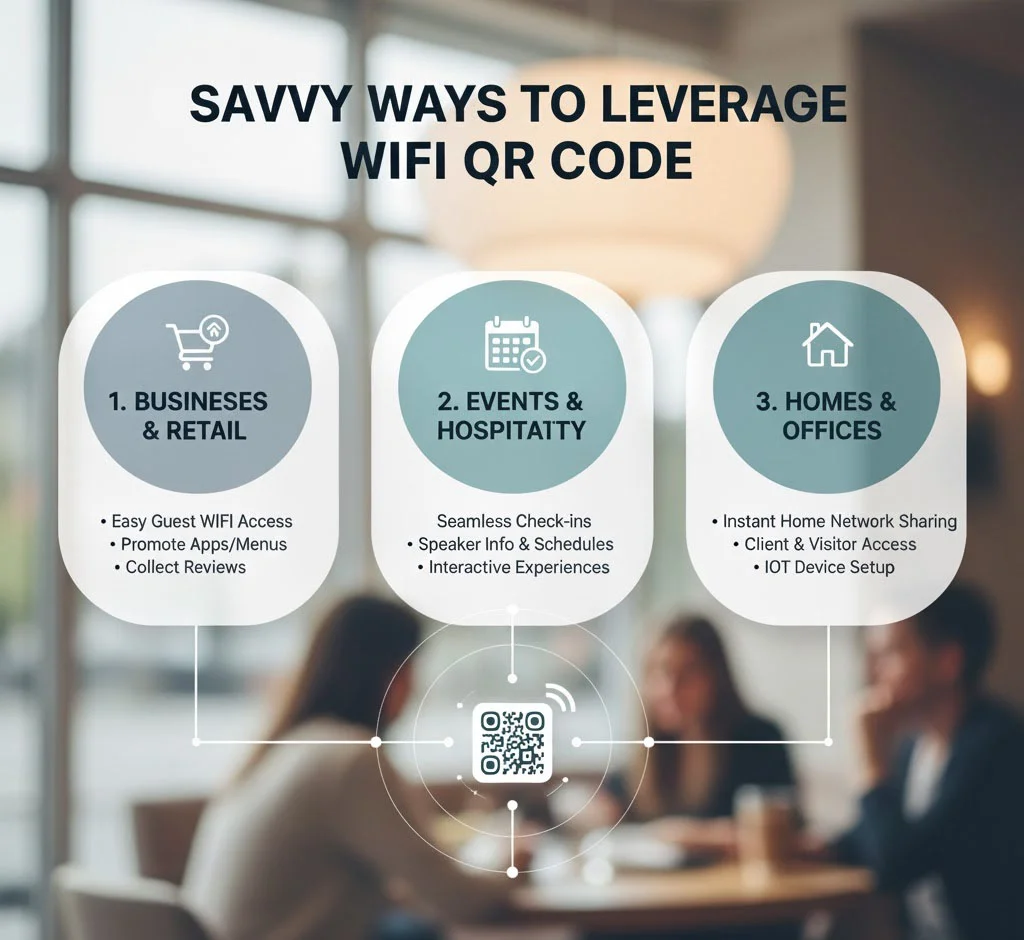
Savvy Ways to Leverage WiFi QR Code

There are simply so many you can do with your brand new WiFi QR Code:

Any location that provides WiFi can appreciate utilizing a WiFi QR Code. It is not only convenient it also reveals that you are considerate enough to simplify things for individuals.

Why You Will Love Using a WiFi QR Code

If you regularly receive guests, customers, or colleagues who demand your WiFi password, then this tool is created with you in mind. Here is why everyone is a fan:

The WiFi QR Code makes life easier for all people. It creates a significant difference due to a minimal adjustment when it comes to people connecting.

Why Choose Our WiFi QR Code Generator

There are plenty of QR tool options on the web, ours is quick, safe, and user-friendly. Here at Print En QR Code, our job is to simplify your life as much as we can. With our WiFi QR Code Generator, you simply enter your WiFi details and click once your code is created right away.

We also respect your privacy. No storage nor sharing of your WiFi information; it is used only to create your QR Code instantly. Thus you can make use of our tool with complete peace of mind.

Our goal is to make it easy to share WiFi with anyone, customers, guests, even your own family without having to endure typing long passwords.

How it Works Wifi Qr Code Scanner

A Wi-Fi QR code scanner works by using a device’s camera to scan an especially formatted QR code bearing the SSID (name) and password of the network.

1. Connect to a Secure WiFi Network

Creating a QR code, make sure your device is connected to a secure and stable WiFi network.

2. Open a WiFi to QR Code Generator

Use any reliable WiFi to QR code generator online. It scans your network information into a scannable code.

4. Generate and Save the QR Code

Press the generate button to generate your WiFi QR code. Then save and download it for quick sharing or printing anywhere.

5. Scan QR Code to Connect Instantly

Use your phone’s camera or a QR scanner app, scan the WiFi QR code, and connect instantly without manually entering any password.

Share WiFi Instantly and Securely

Sharing your internet connection is a breeze with a WiFi QR Code. It’s instant access for your guests: pull up the camera on your mobile device or smartphone, read in the QR Code, and you are connected. No explanations needed, no typos, no “What’s the password again?”moments. 

Whether you want to share WiFi QR code at home or in your business, our tool helps you do it in the smartest and safest way. It’s quick, reliable, and user-friendly.

Create Your WiFi QR Code

It shall take you only several seconds to get started. Prepare QR code for WiFi with our WiFi QR Code Generator, print it, and place it wherever you desire. Provide your guests with instant WiFi access without any difficulties. Simplify WiFi sharing with ease, intelligence, and security with Printen QR Code alone.

Frequently Asked Questions

Yes, it’s safe if shared privately. Avoid posting your WiFi QR Code publicly to prevent unauthorized access.

Yes, scanning a WiFi QR Code automatically connects your device without manually entering the password.

Yes, both iPhones and Android devices can scan WiFi QR Codes using the built-in camera or QR scanner app.

Absolutely! Print and display it at your home, café, or office so guests can connect quickly without asking for the password.

If it’s a static QR Code, no. You’ll need to create a new one. Dynamic QR Codes, however, allow easy updates.

The QR Code itself doesn’t need the internet to scan it simply stores your WiFi credentials for instant connection