Your Instagram URL

Please enter a valid Instagram URL.

Set Colors
#ffffff
#222222
#007bff
Custom Design Options
Main Body Shape
Eye Frame Shape
Eye Dot Shape
Logo Upload
logo
Live Preview
💾 Download Options

Instagram QR Code Generator

Do you wish for people to easily and quickly find your Instagram account? Our Instagram QR Code Generator makes it possible to create your very own Instagram QR Code in under 2 minutes! It is a fully free, simple, no skills required generator for anyone, anywhere. Just paste your Instagram link, design to your own liking, and then download your code.

Whether you are a business, a creator or even just someone who enjoys sharing, an Instagram QR code is the fastest way for people to find you.

Facebook QR Code

Connect your audience directly to your Facebook page or profile to grow your followers with one scan.

Create a QR Code for a URL

Turn any website or landing page into a scannable QR code. Perfect for business cards, posters, and brochures.

WiFi QR Code

Let visitors connect to your WiFi without typing a password. One quick scan and they’re online fast, easy, and secure.

Text to QR Code

Share text messages, quote, or contact info in seconds. Just type, generate, and printen QR code anywhere.

Twitter QR Code

Help people connect with your Twitter (X) profile instantly fast and interactive sharing.

QR Code Call

Let customers call you instantly with one quick scan. No typing, no delay just fast and direct communication.

Google Maps QR Code

Make navigation easy by linking your location customers can find you instantly on Google Maps.

Video QR Code

Connect your audience to your videos instantly with a single scan. Share tutorials, product demos, or personal clips easily.

VCard QR Code

Instantly share contact details digitally using a professional VCard QR code.

How to Get QR Code for Instagram

Making your Instagram QR code is super easy. You can do it in less than a minute:

Get QR Code for Instagram

Input your Instagram URL: Navigate to your Instagram account, copy the URL and paste it into our site.

Design your QR Code: Pick your colours, shapes or even add a logo for a brand look.

Select AI suggests a better option.

Generate your code: Click on ‘QR Code’ and your QR Code will be made in seconds.

Share via downloading: Download your QR code in PNG, SVG or Print in customizable size and get sharing.

That’s it! With our Instagram QR Code Generator, you’ll have your code ready in seconds.

What is an Instagram QR Code?

An Instagram QR code is a small image that opens your Instagram page when scanned with a phone camera. It’s like a shortcut to your profile.

You can use it anywhere on your shop counter, flyers, menus, business cards, product packaging, or even online. With our Instagram QR Code Generator, you can make your QR code for Instagram account in seconds. You can also style it your way choose your favorite color, shape, or even create a QR code with logo in middle to make it look professional and match your brand.

Scan Instagram QR Code

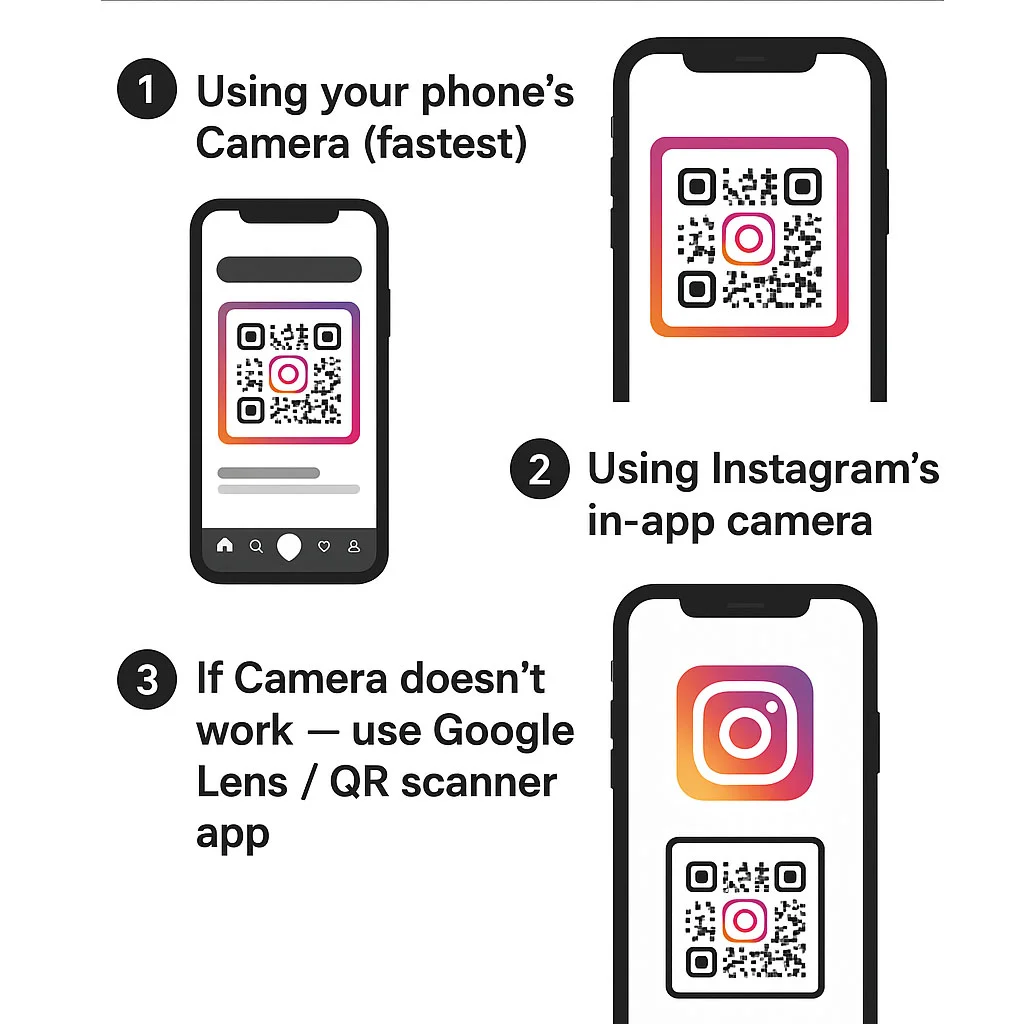
How to Scan Instagram QR Code

Scanning your Instagram QR code is super simple, no special apps needed. Most phones can do it straight from the camera.
Here’s how:

Where to Use Your Instagram QR Code

Your Instagram account QR code can be used almost anywhere. Here are some ideas:

Business cards

Great for quickly sharing your contact info, portfolio, and social media profiles with a single scan.

Posters and flyers

Great for promoting an event, offer, or campaign – once the viewer scans, they won’t have to manually find your page.

Product packaging

Invite customers to follow your brand or see product tutorials straight from product labels or boxes.

Restaurant menus

Customers can scan the menu and view dishes, updates, or online ordering without laying contact with a printed menu.

Websites

Add a scannable code so visitors on your site can easily scan your handles, products, or contact info.

Emails

Include a code in your email signature so recipients can view your social profile instantly.

Static or Dynamic Phone QR Codes

Static Phone QR Code

Dynamic Phone QR Code

Make Your QR Code Match Your Brand

With our Instagram QR Code Generator, you can create a QR code that truly fits your brand. Choose your own color, pick a unique shape, and add your company logo to make a QR code with logo in middle.

Companies employ QR Code for the Insta Account on flyers, in-store displays, packaging and menus. A quite simple but imaginative way to encourage your customers to follow and interact with you on Instagram.

Why Use an Instagram QR Code?

Your Instagram page is often where people get to know you or your business. Adding an Instagram account QR code makes it super easy for anyone to reach your page in just one scan.
Here’s why it’s a great idea:

Wherever you place it, your QR code for Instagram helps people connect with you faster.

Benefits of Using Instagram QR Code Generator

Our Instagram QR Code Generator is built to make your life easier. It’s fast, free, and user-friendly. You can create unlimited codes with no sign-up required.
Here’s what makes it special:

You can even track how many people scan your code (if you use analytics). It’s simple, effective, and helps you understand your audience better.

Frequently Asked Questions

A: Static codes do not expire. Dynamic ones remain active as long as your subscription or service is active.

A: Yes. You can include commas or special characters in the number string, e.g. +1234567890,,,1,,# to navigate voice menus.

A: Most modern smartphones have built-in QR scanning in the camera app. Earlier devices may require a QR scanner app.

 A: Yes. Our tool supports logo insertion, colors, and frames as long as the code remains readable.

 A: Only with dynamic QR codes. Static ones can’t be updated.

 A: In most plans we allow many to check your package. For business users we support bulk generation.