Facebook QR Code Generator

Want people to check out your Facebook page, profile, group, or a specific post? Use our facebook QR code generator.

Just paste your Facebook link, hit ‘Generate,’ and then share it anywhere with flyers, cards, packaging, or online ads. No login or signup needed. It’s fast, free, and keeps your info safe.

WiFi QR Code

Let visitors connect to your WiFi without typing a password. One quick scan and they’re online fast, easy, and secure.

Create a QR Code for a URL

Turn any website or landing page into a scannable QR code. Perfect for business cards, posters, and brochures.

Text to QR Code

Share text messages, quote, or contact info in seconds. Just type, generate, and printen QR code anywhere.

YouTube QR Code Generator

Make your video content instantly accessible; one scan takes users directly to your YouTube channel or video.

Twitter QR Code

Help people connect with your Twitter (X) profile instantly fast and interactive sharing.

QR Code Call

Let customers call you instantly with one quick scan. No typing, no delay just fast and direct communication.

Google Maps QR Code

Make navigation easy by linking your location customers can find you instantly on Google Maps.

Video QR Code

Connect your audience to your videos instantly with a single scan. Share tutorials, product demos, or personal clips easily.

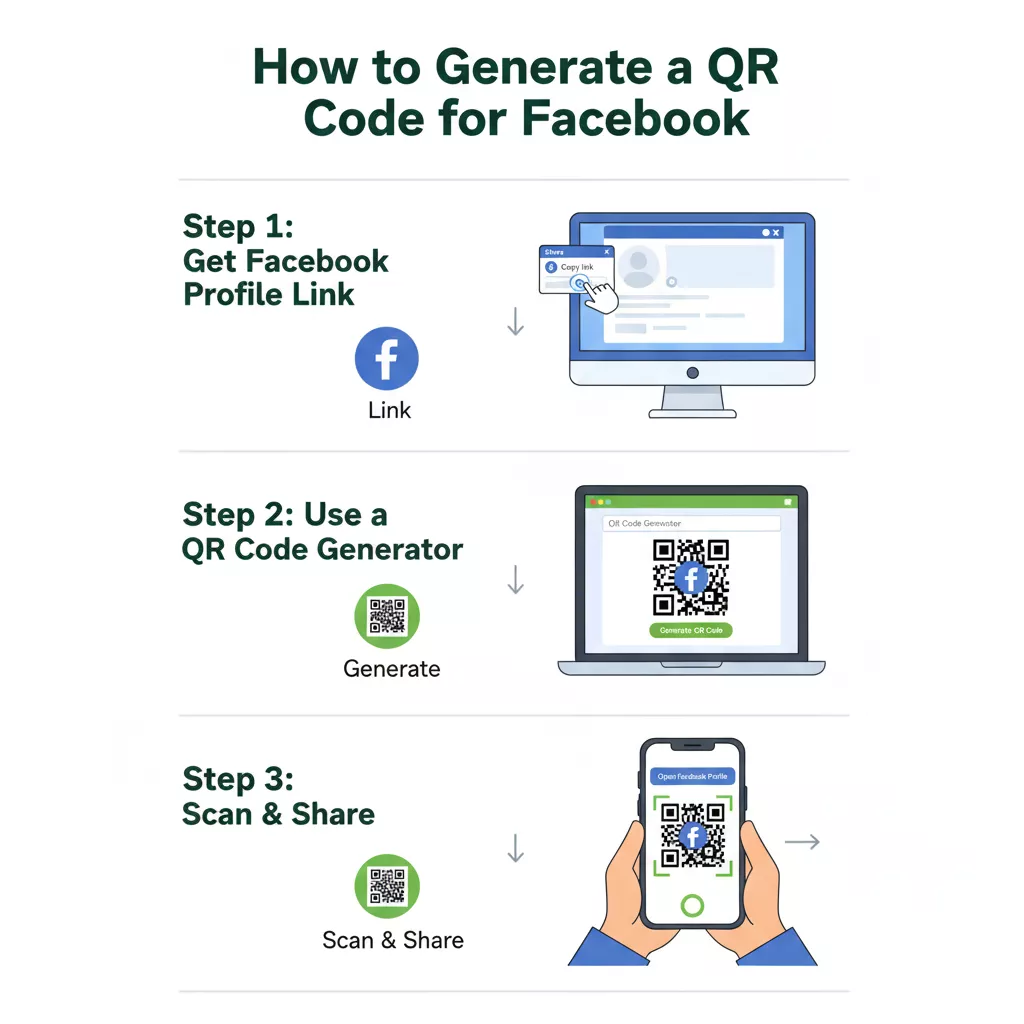
How to Generate a QR Code for Facebook

You can simply search for a QR code in the Facebook app or follow these easy steps to create one for your Facebook profile:

Generate a QR Code for Facebook

Copy the URL of your Facebook Page, Profile, Group, or Post from your browser.

Paste the link into the box above.

Change up the QR code design you can add color, a logo, or a frame if you want.

Use gradient color to make it unique.

Click the “Generate QR Code” button.

Your Facebook QR Code will show up right away.

Download it and share it wherever print or online.

How to get Facebook QR Code on iPhone or Android

Here’s how to use your phone to scan a Facebook QR code. Launch the Facebook app, then navigate to your page or profile. Locate the QR Code by clicking on the three dots (⋯) menu. Facebook will display your QR code, which directs users to your site or profile. It is immediately available for sharing or saving. Not seeing the opportunity to scan a QR code?  No big deal. To create your own code that can be downloaded and shared, simply copy your Facebook link and put it into a Facebook QR Code Generator.

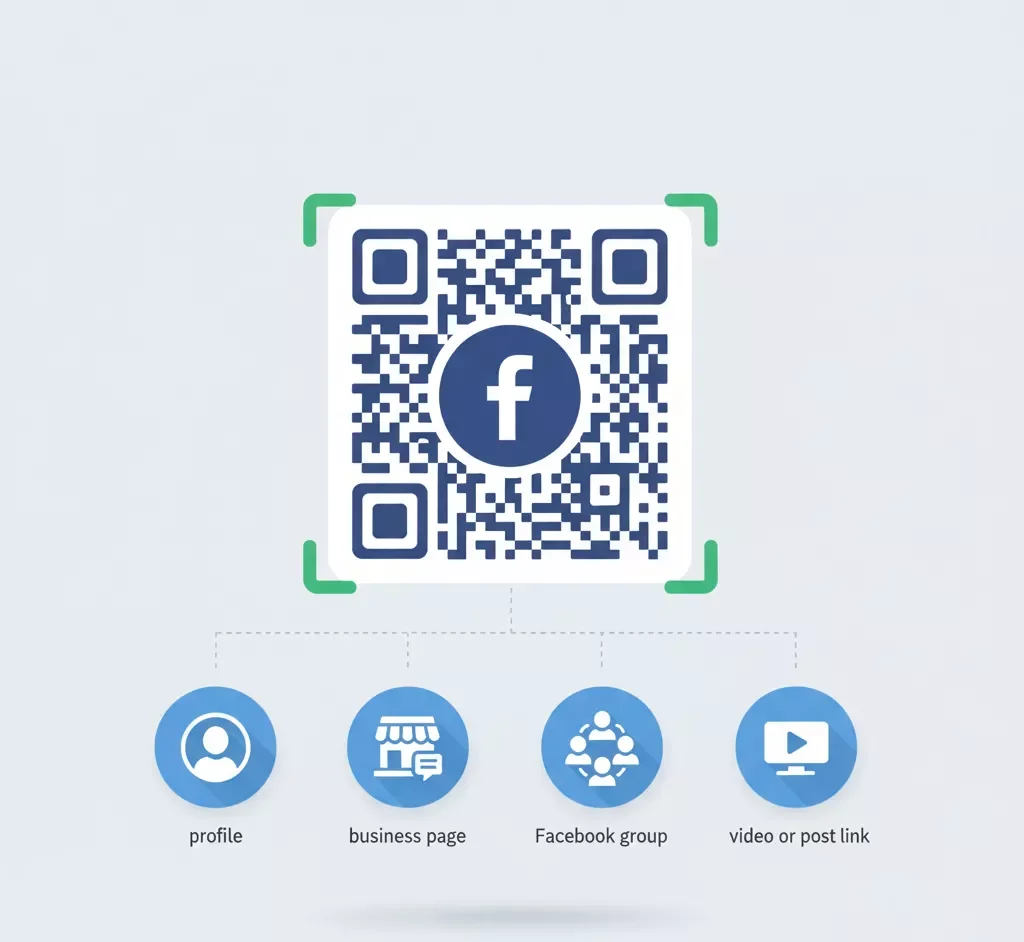
Information Can Display on a Facebook QR Code

What Information Can I Display on a Facebook QR Code?

A Facebook QR code may be used for more than just your page URL; it’s a quick way to publish your content in many forms. You may include items like these:

Where to Use a Facebook QR Code

Users can easily and instantly access your Facebook page by scanning the QR code here you can use it.

Business Cards

Add your Facebook QR code to business cards so that clients can conveniently connect with your page.

Flyers or Brochures

Include it on printed marketing material to encourage consumers to find your Facebook page.

Restaurant Menus

Allow customers to scan and follow your page for offers, reviews, and online ordering.

Product Packaging

Encourage buyers to scan the QR code to follow your brand or leave comments.

Posters and Banners

Use promotional posters to direct visitors straight to your Facebook profile or event page.

Websites and Email Signatures

Use the QR code on brochures, posters, business cards, or on websites, emails, social media wherever your audience is.

Benefits of Using Our Facebook QR Code Generator

Usage Cases of QR Code Link to Facebook Page

Facebook QR Codes are fantastic for business cards, posters, product packaging, and menus. Printen qr make it easy for customers to find your Facebook page.

Promotions for Businesses

QR codes for Facebook on brochures, posters, and in your store to make it easier for people to find your page and follow you. This can help more people find your page and interact with it or share via whatsapp.

Marketing for Events

Add Facebook QR codes on tickets, banners, or invites for events and can find location easily. People can easily get to your Facebook event page to find out what’s new, how to sign up, and what live announcements are happening.

Product Packaging

Add QR codes on the boxes or labels for your products. Customers can read reviews of your products, see sales, or seek help with their purchases on your Facebook page.

Restaurant Menus

Use QR codes to your tables or menus. People can use them to go to your restaurant’s Facebook page to see daily deals, provide feedback, or give reviews.

Social Media Campaigns

Put QR codes for Facebook in your online adverts or posts on social media. Customers may go directly to your Facebook profile, which makes it easier for them to follow and enjoy it.

Frequently Asked Questions

It allows users to scan the code with their phone’s camera and open your Facebook link straight.

Yes, Any Facebook link can be converted into a QR code.

No, there is no registration required, and it is completely free.

Yes, for improved branding, you can change the colors, designs, or even include your logo.

Of course! FB never store or disclose your information.